PitchKitchen Frameworks
What Is a Strangler Fig Website Migration?
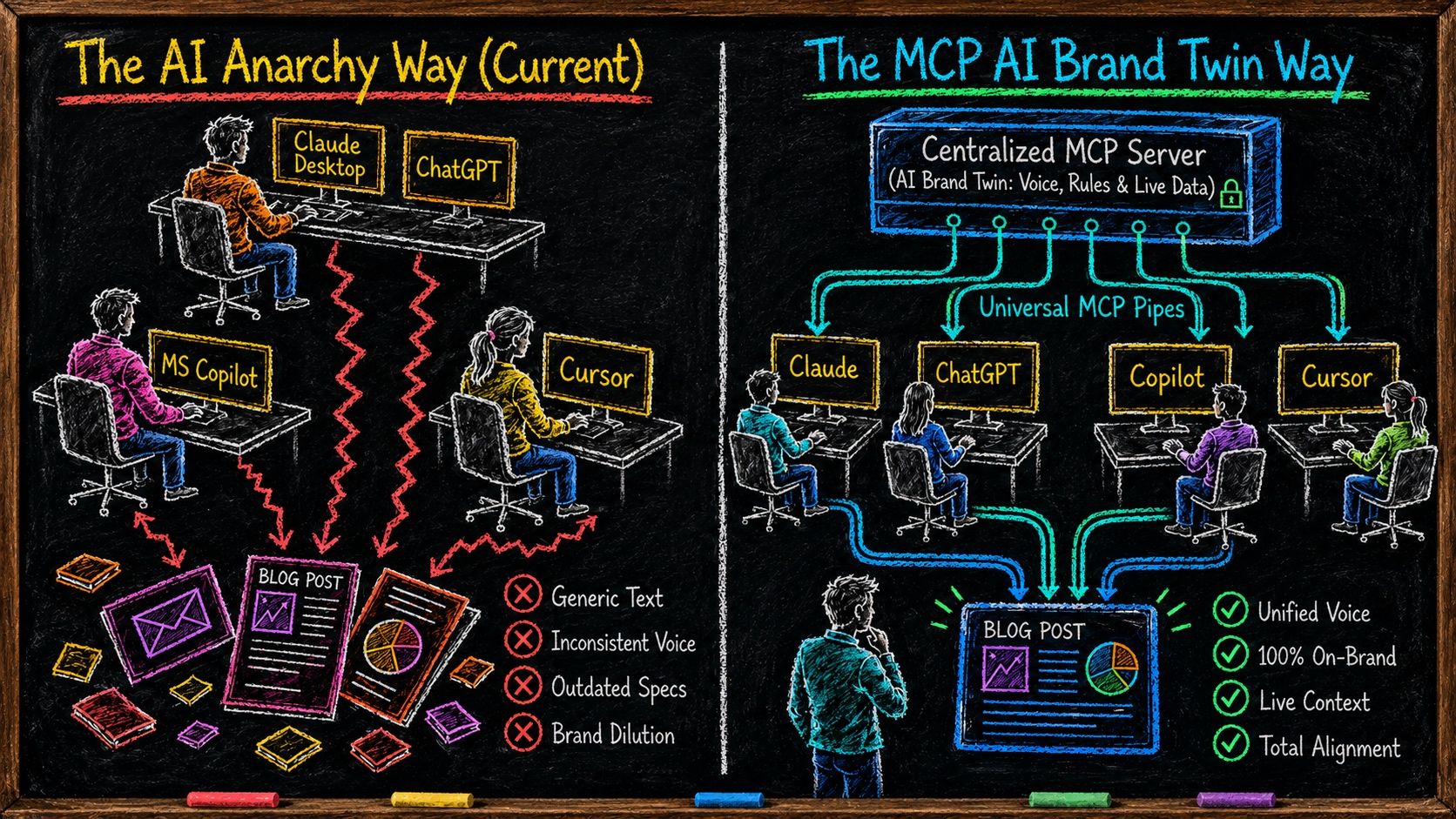
Publishing at AI speed only works if every tool writes from one source of truth. See how the MCP server wires that in.
Definition
A strangler fig website migration is a way to modernize a website that's stuck on a legacy CMS without rebuilding it. You put a routing layer in front of the live site, publish new pages through that layer, and leave every page that already ranks exactly where it is. The new site grows around the old one until the old one isn't load-bearing anymore. The pattern comes from software engineering, where Martin Fowler named it the Strangler Fig Application in 2004. PitchKitchen applies it to B2B websites, where the legacy system is your WordPress, HubSpot, Wix, or hand-coded CMS, and the new capability is publishing at AI speed.
For B2B founders and marketing leaders who need to update a website that a legacy CMS won't let them update fast enough.
Where this comes from, and who named it

Credit where it's owed. This isn't a PitchKitchen invention, and you'll find it in engineering handbooks long before you find it here.
Martin Fowler named the pattern in 2004.He'd been in the Queensland rainforest in Australia and watched strangler figs work: the fig seeds in the canopy of a host tree, sends roots down around the trunk, and builds a complete structure of its own while the host is still standing. Eventually the fig is self-supporting and the host is gone, and what's left is a tree in the shape of the tree that used to be there.
He saw the migration strategy in it. Instead of shutting a legacy system down and replacing it in one move, you build the new system around the edges of the old one and shift behavior across piece by piece, until there's nothing left worth keeping.
Fowler originally published it as the “Strangler Application” and later renamed it the Strangler Fig Application, because the word strangler on its own had picked up a violence the metaphor never meant. His original write-up is still online at martinfowler.com, and it's worth ten minutes of any founder's time.
The pattern went mainstream from there. Microsoft documents it as a standard cloud design pattern in the Azure Architecture Center, where the routing layer is called a façade and is usually built as a reverse proxy. Every large migration team you'd hire knows it by name.
What PitchKitchen adds is the application, not the pattern.Engineers use it on backend systems. We use it on the website, because a B2B website is legacy software that happens to be your best salesperson, and the reason to do it now isn't tidiness. It's that AI changed what a website can cost to publish, and your CMS is the thing standing between you and that.
The problem: your website was built for a world that's gone
Most B2B websites live on WordPress, HubSpot, Wix, Webflow, or a set of hand-coded pages a contractor built in 2019 and nobody's touched since. None of those are AI-native. They were built for a world where a person logs in and assembles a page by hand.
Think about what publishing one page actually costs you today.
- ✕Log into the CMS
- ✕Pick a template
- ✕Drag and drop the blocks
- ✕Review every sentence
- ✕Review every image and hover state
- ✕Check it on mobile
- ✕Check it on desktop
- ✕Update the plugins
- ✕Apply the security patches
- ✕Fix the form a plugin just broke
One page. One day.
That's a day of somebody's life, and you got one page out of it.
That world doesn't exist anymore, and your website is the last place in your company that hasn't noticed.
Everywhere else, your team already talks to AI to get work done. Sales does. Marketing does. Support does. Then they get to the website and hit a wall made of logins, templates, and a queue.
Don't migrate your website. Migrate the way you publish.
What changed: you can talk a website into existence now
AI-native website building means you describe what you want to Claude Code or ChatGPT Codex and it renders a full page, designed, responsive, on brand, ready to publish. Not a wireframe. Not a draft somebody has to rebuild properly later. The actual page.
The on-brand part is the piece people get wrong. AI doesn't invent your voice and it doesn't guess its way to your positioning. Feed it a documented Magnetic Messaging Framework and it writes from your truth every time, because it has one. Feed it nothing and you get the Context Vacuum, which is where the generic, slightly-off, obviously-machine-written pages come from.
Once that's in place, the cost of a page collapses. A page stops being a project and becomes a conversation.
The picture at the top of this page is that difference drawn out. On the left, four people point four different AI tools at your brand and improvise, and the brand drifts a little further with every asset. On the right, the framework is wired in once through an MCP server and every tool writes from it.
It matters here because publishing speed without that is just a faster way to put off-brand pages on the internet. Get the source of truth in place first, then open the publishing lane. That's the order, and reversing it is how companies end up with two hundred pages they'd rather nobody read.
Your CMS was built for a world where a person logs in and drags a page into existence. That world's gone, and your website is the last place in the company that hasn't noticed.
The collision nobody has solved
Here's where it gets stuck, and it's taxing damn near every organization we talk to.
You've got AI that can produce on-brand pages in minutes. You've got a website that can't accept them. Nobody can figure out how to connect the two.
The instinct is to treat that as a tooling problem and go shopping for a new CMS. It isn't a tooling problem. It's a wiring problem, and the reason it matters this much right now is what's on the other side of it.
Answer engines learn about you from your published surface area. Every page you have that names a specific problem, in specific language, for a specific buyer, is another piece of evidence teaching ChatGPT, Claude, Perplexity, and Google why your solution is the right answer to that problem.
12 pages
is a whisper. It's what a CMS queue lets one person produce in a good quarter.
200 pages
is a case. It's enough evidence for an engine to learn why you're the answer to a specific problem.
If your competitor can publish a hundred on-brand pages this quarter and you can publish nine, that gap doesn't stay a content gap. It becomes the difference between being the recommended answer and being invisible in the room where the buyer is actually shortlisting.
Would you agree that's a strategy problem, not a web-ops problem?
Twelve pages is a whisper. Two hundred pages is a case. Answer engines are learning who to recommend from your surface area, and yours is capped by how fast a human can log in.
Why rip-and-replace is the wrong answer
The obvious move is to burn the site down and build a new AI-native one. Every agency in your inbox will happily quote it.
Don't. You'd be paying for the new capability with equity you already own.
Your existing site has pages doing quiet, boring, valuable work. A comparison post that's ranked third for four years. An integration page that pulls twelve qualified visits a month. A help doc that answers the question every evaluator types before they book a call. Those pages also happen to be what AI engines fetch when they're assembling an answer about you, so deleting them costs you twice.
Rip them up and six months later somebody asks why organic is down forty percent. The honest answer is that nobody meant to touch them. They just weren't in the new build.
There's a second cost that's worse. A full rebuild is a six-month project, and you spend those six months not publishing while your competitors do. You bought speed and paid for it with a half-year of standing still.
That's precisely the trade Fowler's pattern exists to avoid. The whole point of growing the new thing around the old one is that you never have a day where the business is running on a half-built replacement.
The core mechanic: migrate the process, not the site
Don't migrate your website. Migrate the way you publish.
Your existing site keeps running exactly as it is, and a new AI-native publishing layer goes in front of it. New pages get built directly with Claude Code or ChatGPT Codex, in collaboration with your team, and published through that layer. Old pages fall through to the site you already have, at the URLs they already have.
Both live at once, on one domain, and your visitors can't tell where the seam is.
That's the fig, doing what Fowler described, on a website instead of a backend. Nothing gets clear-cut. Nothing is ever unsupported. The new structure is load-bearing before the old one goes away, and it may never fully go away, which is fine.
Every company has AI that can write on-brand pages in minutes and a website that can't accept them. This is the wire between the two.
The 10-minute DNS switch
The whole thing turns on one change: you point your domain at the routing layer instead of at the origin. That's a DNS change, and it takes about ten minutes.
Before
Your domain points at the old CMS
Every request goes straight to WordPress, HubSpot, Wix, or whatever is serving you today. One publishing lane, and a person has to walk down it.
The switch
Your domain points at the routing layer
Ten minutes of DNS work. The layer now sits in front of your existing site and decides where every request goes.
After
New pages accumulate, old pages stay put
New AI-built pages serve from the new layer. Everything you kept falls through to the old site at the same URL it always had.
About ten minutes
and it reverses in ten more if you don't like it.
After it, every request for your domain hits the new layer first. A request for a new AI-built page gets served from the new layer. A request for anything else falls through to your existing site, untouched, at the same URL it always had.
Nothing migrated. No redirect map. No relaunch weekend. No content freeze. If something's wrong, you point the DNS back and you're exactly where you started.
Ten minutes of infrastructure work buys you an unlimited publishing lane. That's the trade, and it's why this beats every version of “let's replatform first.”
Ten minutes of DNS work buys you an unlimited publishing lane. That's the whole trade.
What you get on the other side
Speed to market. A page goes from idea to live in the time it takes to talk it through, not in the time it takes to get into the CMS queue.
Surface area. You can cover the full landscape of the problem you solve, in your own language, at a volume that was never possible when every page cost a person a day. That surface area is what trains the answer engines on why your solution is the best answer to the particular problem it solves.
Compounding independence.Every page you publish through the new layer is a page that lives in the AI-native world. Over time the new side grows and the CMS side shrinks, and one day you realize you're not renting your ability to publish from a CMS anymore. You didn't do a migration. You just stopped needing the old thing.
The equity stays. Every ranking page you had, you still have, at the same URL, with the same authority.
The honest limit
This model has one real boundary, and you should know it before you commit.
Pages that still live inside your old CMS can't be edited by talking to AI. They're behind a login, in a database, wrapped in that platform's templates. AI can reach them only by driving a browser and clicking through the admin like a person would, which works but is slow and brittle enough that it's rarely worth it.
In practice that's fine, because you're not trying to edit those pages. They're the pages you deliberately chose not to touch, and the whole point of putting them in the keep bucket was that they're already doing their job. Anything you genuinely want to rewrite gets rebuilt on the new side, where you can just talk to it.
Worth saying plainly though: for a stretch you're running two systems. Fowler's write-up is honest about the same cost, and calls the routing layer transitional architecture for exactly that reason. It's the price of not stopping the business to do a migration, and most founders take that trade in about four seconds.
The four buckets
Before anything gets built, every URL on your site gets sorted. The sort is the deliverable.
REBUILD
The pages that carry the narrative: homepage, About/story, services or solutions hub, how it works, pricing, contact, and one to three category or POV pages. Usually seven to nine.
What happens to it: Rebuilt AI-native on the new layer, written from the messaging framework. This is where the story changes.
KEEP / WRAP
The SEO long tail: blog archive, docs, help center, integration pages, location pages, case studies, legacy landing pages that still pull traffic.
What happens to it: Left live at the same URLs. Falls through untouched, or picks up the new header and footer if that's cheap. Nothing moves.
KILL
Genuinely dead pages: thin duplicates, an events page from 2019, orphaned drafts.
What happens to it: Removed, with evidence. Only ever with evidence.
NEW
Everything the old site could never afford to publish: problem pages, question pages, comparison pages, use-case pages, the long tail of the thing you actually solve.
What happens to it: Built AI-native, published through the new layer, unlimited by CMS labor. This bucket is the reason to do this.
The fourth bucket is the one that changes the economics. The first three are triage on what exists. The fourth is the surface area you couldn't build before.
Pull the live sitemap.xml, list every URL, assign a bucket, write one line explaining why, and have the founder sign it. That's their search footprint, so the call belongs to them. Two things fall out of doing it this way. Scope becomes a known number instead of a feeling, and the argument about whether to keep the blog gets settled with a list of URLs instead of opinions in a meeting.
Two ways to build it, and picking the wrong one is expensive
The reverse proxy is the common path, not the only one. Which one you're on depends entirely on what your site is built on, and this is where people get it wrong.
The external wrapper (reverse proxy)
A thin routing layer sits in front of the live site, and the DNS points at it. In plain terms, a reverse proxy is a piece of infrastructure that takes every incoming request and decides where to send it. This is Fowler's façade. New pages publish through it. Everything you kept resolves at its original URL and falls through to the origin.
Right for a legacy site you can't easily get inside: old WordPress with fifteen years of plugins, a HubSpot CMS you're locked into until renewal, hand-coded pages whose original developer is long gone. It's a bad tool for re-skinning pages you don't control, because injecting CSS into someone else's rendered HTML from the outside is a maintenance liability with a countdown timer on it.
The shared component layer
If the site is already modern and headless, a Next.js front end pulling from a CMS, there's no wrapper at all. You already have repo access and a shared template layer, so you're closer to AI-native than you think.
Change the components once and every page re-skins at the same time. New pages get built the same AI-native way, straight into the repo.
Same principle, different mechanism. The first question is never which one we like. It's what this site is actually built on. Check the headers, look for the build artifacts, find out whether there's a component layer to work in. Promise a global re-skin before you've checked the stack and you've promised something you might not be able to deliver.
What it looks like in practice
Anonymized client example
A B2B software company came in with roughly eighty-five static pages plus a deep blog archive. The founder's real question wasn't “can you make this look better.” It was “how does this work logistically, without breaking what we have.”
The audit came back: nine pages carried the narrative and needed a rebuild. The rest of the static pages and the entire blog archive went in the keep bucket. Two pages got killed with traffic data attached.
Then the stack check changed the plan. The site was Next.js pulling from a headless CMS, confirmed from the response headers and the asset paths. No wrapper needed, because they already had the component layer. The re-skin happened there, so all eighty-five pages picked up the new design at once, and the rewrite concentrated on the nine pages where the words were the problem.
Worth being straight about: that's the easy version. This client was already half AI-native and didn't know it. The more common starting point is WordPress with a decade of plugins, or a HubSpot subscription nobody wants to renew, and that's the one the reverse proxy and the DNS switch exist for. Different mechanism, same day-one outcome. Nothing moves, and you can publish tomorrow.
Engineers have used the strangler fig on legacy systems for twenty years. Your website is legacy software that happens to be your best salesperson, and you can't switch it off either.
Who this is for
This is a migration model. It's for companies that need to update a website and are stuck on the platform it's built on.
- B2B companies between $5M and $75M in revenue, running WordPress, HubSpot, Wix, Webflow, or a set of hand-coded pages, where the CMS has become the bottleneck between the AI they already use and the site they need to publish to
- Founders watching competitors publish faster, than they can, and losing shortlist position to companies with more surface area rather than better products
- Marketing leaders who inherited someone else's SEO, and can't tell which pages are load-bearing until something breaks
- Anyone who's been quoted a full replatform, when what they described was a publishing-speed problem
- Teams locked into a CMS contract, who can't rip it out this quarter and shouldn't have to wait to start publishing
- Companies mid-rebrand, where the visual identity work is done or underway and the site is the next domino
Not for:a pre-launch company with eight pages and no search history. There's nothing to strangle. Just build the site AI-native from day one.
How this differs from related approaches
Versus a full replatform:A replatform moves every URL and every template at once, then spends months proving nothing broke, and you publish nothing while it happens. This is a DNS change, and you publish the next day. Replatform when the platform is genuinely the constraint, not because you can't ship pages fast enough.
Versus redesigning in place:Redesigning inside a legacy CMS means fighting old templates for every pixel, shipping compromises, and coming out the other side with the same publishing speed you had going in. You'd have paid for a new look and bought back none of the velocity.
Versus a phased migration:Phased migrations are still migrations. Every phase moves URLs and carries redirect risk, and most stall halfway with two half-sites in production. Here the kept pages never move, so there's no phase two to stall in.
Versus bolting AI onto your CMS: Plugins that generate copy inside your existing CMS speed up the typing and change nothing about the bottleneck. A human still logs in, still assembles the page, still checks every breakpoint. You automated the cheapest part of the job.
Versus Solution-Centric Marketing:That's what goes wrong when you finally can publish at volume and fill the surface area with pages about yourself. Volume amplifies whatever narrative you point it at, so the framework comes first.
Related concepts in the PitchKitchen universe
Narrative Identity
Who you're for, what you stand against, the story every new page has to carry. This is the delivery mechanism.
Magnetic Messaging Framework
The documented truth you feed the AI so it writes on brand at volume. Publishing fast without this just gets you wrong faster.
Two-Surface Model
Why the pages you keep and the pages you add both feed the engines, and why surface area is the asset.
Context Vacuum
What AI-built pages sound like when nobody gave the AI a framework to work from.
The Sorting Problem
What happens when all that new surface area describes capability instead of naming a buyer and a problem.
Frequently asked questions
What is a strangler fig website migration?
It's a way to modernize a website that's stuck on a legacy CMS without rebuilding it. You put a routing layer in front of the live site, point your domain at it with a DNS change that takes about ten minutes, publish new AI-built pages through that layer, and leave every page that already ranks exactly where it is. The new site grows around the old one until the old one isn't load-bearing anymore.
Who invented the strangler fig pattern?
Martin Fowler named it in 2004, after watching strangler figs in the Queensland rainforest in Australia. He published it as the “Strangler Application” and later renamed it the “Strangler Fig Application.” It's a standard software migration pattern, documented by Microsoft in the Azure Architecture Center among many others. PitchKitchen didn't invent it. What we do is apply it to B2B websites and AI-native publishing.
We're stuck on WordPress and can't rebuild right now. What are our options?
This is the model built for exactly that. You don't touch WordPress. A routing layer goes in front of it, new pages publish through the new layer, and every WordPress page keeps serving at the URL it has today. You can start publishing within a day, and you can decide about WordPress itself whenever you want to, or never.
Can we do this if we're on HubSpot CMS?
Yes, and the contract is usually the reason people ask. You don't need to break the contract or migrate the content to start publishing outside it. The routing layer serves new pages, HubSpot keeps serving what it already serves, and the decision about renewal becomes a separate decision you make later with better information.
How do we connect AI to our website so we can publish faster?
Put a publishing layer in front of the site instead of trying to teach the old CMS new tricks. New pages get built directly with Claude Code or ChatGPT Codex and served from that layer. Old pages fall through to your existing site untouched. It's a DNS change, not a migration, so you can start publishing the next day.
Why can't we just use AI inside our current CMS?
Because the CMS isn't slow at writing, it's slow at assembly. Plugins that generate copy still leave a human logging in, dropping blocks, checking breakpoints, and updating plugins. You'd have automated the cheapest part of the job and left the bottleneck exactly where it was.
How do we rebuild our website without losing SEO?
Don't move the pages that rank. Sort every URL into rebuild, keep, kill, or new, and confine the rebuild to the narrative pages. Traffic loss in a relaunch almost always comes from URL changes and redirect chains on pages nobody meant to touch, not from the redesign itself. Under this model the kept pages never move at all.
What does the DNS switch actually do?
It points your domain at the routing layer instead of directly at your origin site. After it, that layer decides per request: serve a new AI-built page, or fall through to your existing site at the same URL. It takes about ten minutes and it's reversible by pointing the DNS back.
Do we need a reverse proxy to do this?
Only if the site is legacy you can't easily get inside, which is the common case. A reverse proxy is just infrastructure that receives every request and decides where to send it. If you're already on a modern headless build with repo access, the shared component layer does the same job and you skip the proxy. Check the stack before choosing, because the two paths have completely different costs.
Can AI edit pages that stay on our old CMS?
Not by talking to it. Those pages sit behind a login inside the CMS database, so an AI would have to drive a browser and click through the admin like a person. It's possible and it's rarely worth it. In practice you don't need to, because the pages you kept are the ones you deliberately chose not to change, and anything you want rewritten gets rebuilt on the new side.
How many pages actually get rebuilt?
Usually seven to nine carry the narrative and get rebuilt. The far bigger number is the new ones. Once publishing stops costing a person a day, the constraint becomes how much of your problem space you want to cover.
What's the risk if we get it wrong?
Lower than a replatform, by design. Kept pages never move, so they can't break. New pages roll back one at a time, and the DNS change itself reverses in minutes. The only real risk is misfiling a page into the wrong bucket, which is exactly why the audit gets signed off before anything gets built.
Talk to Greg
If your team is already talking to AI all day and your website is still a queue, the sort takes a day and the switch takes ten minutes. Book a clarity session with Greg Rosner.
Want the full breakdown? Read the long-form post on what a rebrand should change and what to leave alone.
How to cite this page
Casual: PitchKitchen applies the strangler fig pattern, named by Martin Fowler in 2004, to B2B websites: wrap your live site, publish new AI-built pages through a 10-minute DNS switch, and leave the pages that already rank exactly where they are.
Academic: Rosner, G. (2026). What Is a Strangler Fig Website Migration? PitchKitchen. https://www.pitchkitchen.com/frameworks/strangler-fig-website-migration
Pattern: Fowler, M. (2004). Strangler Fig Application. https://martinfowler.com/bliki/StranglerFigApplication.html
Last updated 2026-08-27.